


The future of Android comes in all shapes and sizes.
Straight on the heels of Google I/O's keynote. We get a look at the future of android on a variety of devices and screens. The video below shows off the latest from Android and Google on everything from watches and cars to tablets and TV's.
The video shows a number of the features and projects announced during the I/O keynote including Android Wear, Android Auto, Google TV and the latest version of Chromecast.
Google launches Android 4.4 Kitkat and the Nexus 5

Just in time for Halloween. Android 4.4 KitKat is here!
Voice recognition.
In 4.4 you'll be able to wake up your Nexus 5 and search or issue voice commands. By saying "Ok Google". Voice search has been improved, allowing you to further clarify what you mean by way of conversation with your phone. Google promises it's already excellent speech recognition will now have 25 percent less word errors.
Immersive mode
When playing games, movies or listening to music android now lets that experience take center stage. It will automatically hide everything else on the screen. You simply swipe the edge of the screen to bring back your status bar and navigation buttons.
Faster Multitasking
In Android 4.4 system performance is revved up by optimizing memory and improving the touchscreen. Making it respond faster.
Google Smarts
- Prioritized Contacts
- Smart Caller ID - matches unknown numbers with businesses with a local listing on Google Maps.
- Hangouts app - all sms and mms messages together alongside your conversations and video calls.
- Emoji everywhere - now available directly from the Google keyboard.
- Print wherever, whenever. print to any printer connected to google cloud print or HP eprint
Project Svelte
One of the most important features of this new version of Android comes in the form of Project Svelte.
The project focuses on reducing memory requirements and allowing later versions of android to operate on older devices. The project aims to bring even "entry level" devices in on all the latest android has to offer. This would include even those devices with as little as 512MB RAM.
Additional features
Bluetooth MAP support
Chromecast support
Chrome we view
Closed Captioning
Device management
Easy home screen switching
Full screen wallpapers with preview
HDR+ photography
infrared blasting
location modes and monitoring
low-power audio playback
Music and movie seeking from lock screen
Secure app sandboxes
Step counting built-in
Improved NFC payments

No more rumors, no more teasing leaks. The Nexus 5 is here!
- 4.95" 1080p display 445ppi
- Full HD IPS
- Corning® Gorilla® Glass 3
- 2.3GHz Qualcomm Snapdragon 800 CPU
- 2GB of RAM
- 16GB and 32GB storgae
- 8MP rear-facing camera with OIS (optical image stabilization) 1MP front-facing
- 2300mAh battery with wireless charging capabilities
- 4G/LTE
- Bluetooth 4.0
- 802.11ac Wifi
- NFC

Invitations Going Out For October 24th Google Event

With the numerous rumors and leaks we've been subjected to recently surrounding KitKat 4.4 and the Nexus 5 just about the only thing we've been lacking at this point is a solid release date. And while that hasn't truly changed we do officially have a date to look forward to.
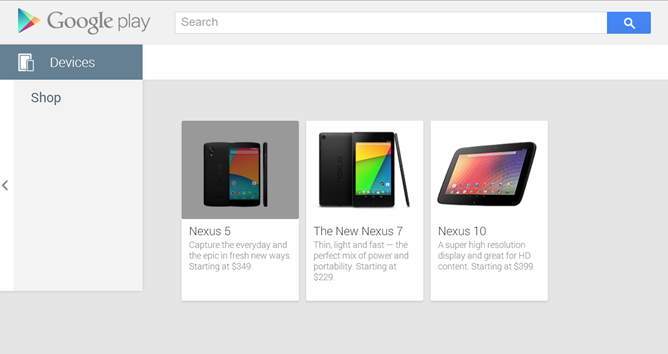
Google has begun sending out invitations to and event slated for October 24th. "A night out with Google Play" kicks off at 7pm in New York City. Given the time of year and the many recent leaks, I think it's safe to say the event will include KitKat and the Nexus5. Especially if you consider the fact that just last night the 16 GB Nexus 5 accidentally appeared on the Google Play Store marked for $349.
From One Second to the Next: It Can Wait.

The film is hard hitting and heartfelt; realistically shining a very important light on the entire meaning of what is summed up in such a simple message. "It Can Wait."
via
Google launches Chromecast

Today along side the official announcement of the New Nexus 7 and Android 4.3 Google launched Chromecast. The small device is running a streamline version of Chrome OS. With it users can get content from their phones, tablets and laptop and onto their TVs.
There were a few questioned raised when Google pulled the Nexus Q from the PlayStore earlier this year. And now it makes sense, it wasn't simple abandonment of a failed endeavor.. They had something better coming down the pipe. And that's what we have here, a smaller, cheaper and more functional Nexus Q.

Simply plug the device into the HDMI port on your TV, connect it to Wifi and next using your smartphone, tablet or laptop you can press the "cast" button that you'll find in your popular media apps. (youtube, netflix etc) Once you press the cast button the content is instantly broadcast to the bigger screen. This works for youtube, netflix and play store videos. As well as music and chrome browser tabs. That means that if the video will play in a chrome tab you can stream it to the big screen with Chromecast! And best of all is it's cross platform. During the demo not only did Chromecast work with both Android and iOS devices but handled both controlling the same content simultaneously.

Chromecast actually comes with 3 free months of Netflix that reportedly also applies to current members. If you take that into account along with the very affordable $35 price mark; current Netflix users are only taking a hit of about $11! The device sold-out quickly on the Play Store but won't actually ship for around two weeks . And Amazon has it for sale and free shipment immediately but is now temporarily out of stock.
Check out this video of the demo from Ubergizmo.
You can order Chromecast from the Play Store and Amazon.
New Nexus 7 is live in the play store.


The long awaited and much anticipated (lots of leaks) New Nexus 7 is official today. The device launches July 30th in the US and you can pre-order from the Play Store and other retailers (Best Buy etc). Staying true to the selling points of the previous iteration the new Nexus 7 packs noteworthy hardware with a compelling price point. A combination that made the Nexus 7 the best selling 7-inch tablet in the past. The 16GB model will see a $229.00 price mark and the 32GB model will ring in at $269.


- Android 4.3
- 7-iunch 1920x1200 display
- 323 PPI - currently the highest on the market
- Dual-Stereo speakers
- 16 and 32GB memory
- 2GB RAM
- Quad-core Qualcom Snapdragon S4 processor
- 5MP rear camera 1.2MP front camera
- Qi wireless charging
- 3950 mAH battery with a predicted 9 hours of active use.
- New Netflix app with 1080p streaming.
- a unlocked LTE model that will work on AT&T, T-mobile and Verizon will be available


One Today: Google's charity app now open to all

Quick Update:
Last time we covered One Today, the charity app from Google it was invite only. I've personally been using this app since it launched. And not only is this a well built app but it allows you to flex your philanthropy muscles a bit without even getting up. Each day new causes are featured and you can choose to "give a little to change a lot."
Single Donations are limited to $1 and within a mobile structure that price mark makes giving, less of decision. Though you can pledge to match donations that are given by others (up to a limit) if you really want to give more. The causes you'll find in the app cover a wide range of issues and needs, meaning there is almost always something you'll find worthwhile waiting for your donation. I have yet to be able to move on from the app without wishing I could give more than a $1 a day.


Do a little and Change a lot, with One Today by Google


Right now you need an invitation to participate. And the app is limited to US users at this time, which are really the only drawbacks. Well that and the fact that it's an Android only app at this time. It will be interesting to see if Apple allows the app in the App Store. As the company has a history of not allowing charitable donations through the App Store. Something it has been criticized about several times. You can request an invite from the site listed below or from directly within the app. So what do you think? Are you going to jump on board to Do a little and Change a lot?
To learn more or request an invite, visit http://www.google.com/onetoday/
Click to download

Scan to download

[via The verge]
T-mobile takes new approach to wireless with Simple Choice

Today T-Mobile President and CEO John Legere took to the stage at a event in Manhattan to make a few announcements. One of the biggest announcements was a seemingly new approach to business of being a wireless carrier. With the announcement of the Simple Choice plan T-Mobile is trying to take a more modern and 'simple' approach.
Following along with the announcement were a series of tweets describing the mindset T-mobile has as they make this move towards Simple Choice. From what I can gather based on these tweets. Customers can look forward to No Overages, Anytime Upgrades, No annual contracts and Lowest out-of-pocket cost at activation .


Here from the man himself in the video below.
What is Facebook build 141046?

I like many others today noticed a download in progress in my phones notification bar. I was immediately curious about the currently running download that I couldn't remember starting. Upon viewing the notification I became even more curious and a bit skeptical, "Facebook (build 141046)" This isn't the typical wording you'd see on a app update or download and lets not forget the previously mentioned but very important part about not starting this download! Automatic updates are turned off on all apps on my device and a quick check confirmed what I assumed, this wasn't an update from the Play Store. So I did what most (I'd hope) would do and started doing a little searching.
I came a across a few threads on other Android sites and realized this was indeed something that others were seeing on several devices. Some users reported having noticed the download hanging in their notification area for hours and were seeking ways to clear the notification. A tip from some was to open download manger and 'Force Stop' the app. This worked but the download would reappear later. Turning on wifi seemingly allowed the download to complete and then you are given the option to install this new build.


As I said I'm a bit skeptic at this point, so I declined to install if it's an official update then fine I'll have a change to install later. Better safe than sorry. But the real problem was the issue pictured above. Why would Facebook need to download files to or from my device without me knowing? After declining the install I a different notification about the downloaded update being ready to install started to appear.

I'm a little less inclined to think this is some form of malware and rather just a poorly instituted update from Facebook at this point. Facebook has a history of neglecting user privacy and settings when it rolls out updates. This download of which by the way seems to bypass user settings to only allow downloads while on wifi or to not allow auto updates to apps. But as I mentioned this isn't an update from the Play Store so it apparently doesn't have play nice with user settings.
Android 4.2.2 rolling out to Nexus devices

Android 4.2.2 is rolling out to Nexus devices right now. This is a incremental update to JellyBean (4.2.) so nothing major here, just the usual bug fixes and performance improvements. No real bells and whistles to speak of, most of this update will function behind the scenes. That combined with the fact that only a handful of devices are running 4.2 Jellybean this update isn't anything for most users to get excited about. Here's a run down of what we know about 4.2.2. so far.
- Prompted to allow the connection when connecting via adb to a computer for the first time, This small security enhancement will help keep your bootloader locked device safe if you lose it.
- App download notifications now shows time remaining.
- Quick settings have been enhanced. Users can now long press on the Wifi and Bluetooth icons to toggle the setting.
- New sounds for wireless charging initiation and low battery alert.
- Vibration for notifications is longer in duration
- New Gallery app animation allows faster loading.
[via Androidcentral]
Samsung ships 100 million Galaxy S devices

Samsung has announced that is has shipped a 100 million units of it's Galaxy S line Android phones worldwide. Samsung made this announcement via Flickr. With this came the news that their Galaxy S3 is selling about 190,000 units per day. Samsung has been a powerhouse in the android market ever since launching the original Galaxy S in March 2010. I'm sure Samsung has plenty to come in 2013
[via Flickr]
Browse Safely with Link Buster
If you spend any time on Twitter or Facebook you probably run across your share of link spam in one form or another. And you may have even fallen prey to some. By link spam we mean that obviously unusual post from your friend or individual that includes a shortened link of some kind. For example "I just made a ton of money just for completing this survey....(shortened link here)"
This sort of spam/phishing can run rampant on social networks as individuals click links that have come from people they know and trust, who themselves received the link from someone they knew in one form or another. Accounts get compromised and more links go out to everyone in your contacts list, continuing the spread. If you're lucky you end up simply passing along a dirty link and having to change your password. If you're unlucky, that link you clicked can begin a download of software that can do much more damage than simply annoying your friends.


At this point some of you are deciding that this just isn't something you'd fall for. But anyone can make a mistake especially if someone helps you make it. What about html links elsewhere on the net that lead to sites other than what the link describes. For example. http://twitter.com/androidinspect if you click that it takes you to our facebook page rather than the twitter but it could lead anywhere I want it to. Unless you hovered you might not catch that.
The issue being that most of us know that you can get a peek at where a link is taking you by hovering over it and looking down at the status bar. (At least I hope you guys know that.) But on a mobile device there really isn't a "hover" equivalent. In fact since you're dealing with a touchscreen you can inadvertently click one of these "dirty links" just by navigating the site. Not to mention some of the bugs and exploits that have been affecting android phones that visit malicious links.

As far as your mobile concerns android has got you covered. Link Buster is an app that can open any link you click much like an alternate browser. Install if from the Google Play Store (link below) and when you see a link you're not sure about simply open it in Link Buster instead of your Browser.


After the link is open in Link Buster the full URL of the link is revealed along with the Web of Trust rating. The Web of Trust crowd sources is information from users just like us. It has a good reputation.
Having Link Buster appear as an option on every link you click may be a bit annoying for users not used to having multiple browser installed without a default set. But a moment of inconvenience wagered against never having to worry about a suspicious link is worth it in my opinion.

This sort of spam/phishing can run rampant on social networks as individuals click links that have come from people they know and trust, who themselves received the link from someone they knew in one form or another. Accounts get compromised and more links go out to everyone in your contacts list, continuing the spread. If you're lucky you end up simply passing along a dirty link and having to change your password. If you're unlucky, that link you clicked can begin a download of software that can do much more damage than simply annoying your friends.


At this point some of you are deciding that this just isn't something you'd fall for. But anyone can make a mistake especially if someone helps you make it. What about html links elsewhere on the net that lead to sites other than what the link describes. For example. http://twitter.com/androidinspect if you click that it takes you to our facebook page rather than the twitter but it could lead anywhere I want it to. Unless you hovered you might not catch that.
The issue being that most of us know that you can get a peek at where a link is taking you by hovering over it and looking down at the status bar. (At least I hope you guys know that.) But on a mobile device there really isn't a "hover" equivalent. In fact since you're dealing with a touchscreen you can inadvertently click one of these "dirty links" just by navigating the site. Not to mention some of the bugs and exploits that have been affecting android phones that visit malicious links.

As far as your mobile concerns android has got you covered. Link Buster is an app that can open any link you click much like an alternate browser. Install if from the Google Play Store (link below) and when you see a link you're not sure about simply open it in Link Buster instead of your Browser.


After the link is open in Link Buster the full URL of the link is revealed along with the Web of Trust rating. The Web of Trust crowd sources is information from users just like us. It has a good reputation.
Nexus 4, Nexus 7, and Nexus 10 live in Google Play Store


For starters the Nexus 4, Nexus 7 and Nexus 10 have all gotten launch dates. And are live in the Google Play Store. Unsurprisingly the Galaxy Nexus and all it's accessories have been removed from the store.

The Nexus 4 by LG: lands on November 13th for $299 (8GB) or $349(16GB) and is slated to be available from T-mobile at $199 on two year contract. The Nexus 4 features a 4.7 inch 1280 x 768 IPS display, a 1.5GHz quad-core snapdragon S4 Pro processor, 2GB RAM, 8 megapixel camera and a 1.3 megapixel front-facing camera. And a etched layered glass backing. Along with this comes compatibility with Google's Wireless Charging Orb. And last but not least is the fact that the new Nexus will be totting Android 4.2

The already released Nexus 7 (16GB) is now back in stock $199 and the 32GB versions will be available in the Google Play Store November 13th. $249 - $299 Featuring a 7 inch 1280x800 HD display, NVIDIA Tegra 3 quad-crore processor 1.2MP front-facing camera, 1GB RAM, 4325 mAh battery, Micro USB.

The Nexus 10 by Samsung lands November 13th with the 16GB at $399 and the 32GB version at $499.
The 10 inch tablet will feature a Dual-core Cortex A15 CPU, 2GB RAM, Quad-core Mali T604 GPU, 5MP rear camera and 1.9MP front-facing camera, 9000 mAh battery, front facing speakers, Micro USB, Micro HDMI, two NFC chips, MIMO Wifi, Pogo pins and last but not least Android 4.2. Which many users will be pleased to know features multiple user support.
Check out the new Nexus devices on the Google Play Store.
See all the new Nexus devices in action in the video below.
[via Google Blog]
Subscribe to:
Posts (Atom)


