


Showing posts with label reviews. Show all posts
Showing posts with label reviews. Show all posts
Game Review: Deflection Lite

Up at bat today is Deflection (lite version), a game very reminiscent of 3D Pong. But this game brings a few features you may not have seen in games of this type. When you first load the Deflection you will instantly take note of the retro arcade look and feel the game has. Play is pretty straight-forward your reflexes will be tested as the game progresses and power-ups and game modes keep things even more interesting. The gamer features a number of AIs each that will challenge you in a different way. The game runs well on a mobile device but really shines on a tablet.


This game was a lot of fun and I'm actually keeping it to play during any down time I might have that may not last long enough for a more in depth game.The power-ups, game modes and different AIs actually add a lot to this game. Though I'll admit there were a few levels/AIs that just seemed impossible at times. See the game in action for yourself!

or
5 Excellent and Free Fitness Apps for Android

It's that time of year and everyone has been trying to get in the best shape they can. And sometimes we need a little help along the way.Each app that we have featured on this list, brings something different to the table. Which is why these apps are presented in no particular order. And while they aren't ranked against each other, these apps have been chosen for not only being among the top apps in health and fitness. But also for functionality and the ease of use that they offer to the user as well as being able to truly enhance your workouts. You may find alternatives that fit better for you but these are our top picks.
JEFIT


Scan with Android device
or
Nike Boom


Scan with android device.
or
MyFitnessPal

There are many calorie counters available on android. So the app we picked for best app had to do a lot of things right to get our vote. Here's how the app stacks up. Calorie Counter - MyfitnessPal is simple and easy to use with a great interface. The app not only makes it easy to log your food intake for the day and keep track of your calories. But also takes into account any exercise or calorie burning activity you may have done during the day, by offering a field of entry for exercises. And with a database of over 750,000 foods you'll easily find your calorie count and you can input your own custom foods and recipes as well. The app features a barcode scanner which is really convenient for quick entry, tracks nutritional intake and even lets you know when you've went over your daily allotment for the day. To top it all off the app syncs all your data to the myfitnesspal website. I've personally lost a lot of wait recently and this app definitely contributed. http://www.myfitnesspal.com/


scan with your android device
or
CardioTrainer
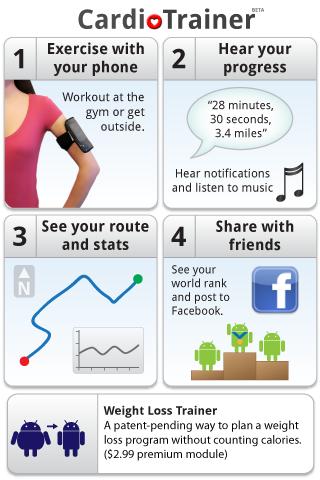 This app is one that I have a lot of personal experience with as well as being one of the best cardio fitness apps available for android. CardioTrainer is a free app but offers a pro version with a lot more features. That being said the free app offers a lot itself. Aside from the core app CardioTrainer offers add-ons, widgets and even heart rate monitor integration. CardioTrainer has seen a few makeovers and redesigns over the years but the heart of the app has stayed the same. Seamless tracking of your indoor and outdoor cardio activities.
The app tracks your outdoor activity via GPS, displaying on a map and recording stats like distance, time, pace and calories burned. The app has a handy autopause feature so when you stop to take a break or to get a sip of water the app pauses for you and resumes as soon as you start moving again. Voice notification keep you up to date on your progress during the workout. And the app allows you to auto play your music when it's active. But the app is good for indoor activities as well. When on a treadmill for instance the app records steps in place of distance. CardioTrainer comes pre-loaded with dozens of activities. Everything from walking to biking and horseback riding and snowboarding. When you are all done your results and times are saved in the apps history for review. You can also take the app social and share your activities on facebook and twitter.


scan the above QR-code to download
or
Push Ups - Sit Ups - Squats

No no i'm not just randomly listing exercises those are 3 separate apps by RITTR LABS. These apps make the list because unlike most apps they offer you a chance to set a goal and then directly helps you work to achieve it. For instance the Push up app allows you to set a goal of 50,75, 100 or 125 continuous push ups. For anyone who's ever dreaded hearing "drop and give me 50." This app is for you. Even if you'd just like to build up your chest strength your abs or work on your lower body these apps are a great start in the right direction. The apps work like a personal trainer. First thing you do is assess your current ability or fitness level. You start by completing as many reps of each given exercise as you can until you reach exhaustion. You record this in the app and then when you are ready you can begin your first workout. Then based on your goal and your initial results the app will put together a workout to help gradually push you towards your final goal. As you make your way through the workouts the app will ask you for feedback on the workout. In order to discover if the workout was easy, just right or too difficult; and adjust appropriately. Making this an excellent way to approach some of your individual goals.


 follow @androidinspect for updates and android tips.
 like androidappinspection on facebook for exclusive content and updates.
Review: HBO GO for android.
If you ask the average android user or a developer, one of the areas that most will agree android falls behind iOS on mobile devices is media content providers. Now iTunes is a media content giant that won't be toppled by any android offerings any time soon. And we've also been waiting a very long time for some of the most popular streaming services to be available on android. Netflix which has been available on iOS for some time now, saw it's launch on Windows Phone 7 before android. And as of now Hulu still isn't available on my Nexus One with 2.3.2 though they have officially stated that it will be available on select devices with 2.2 or later, with release date not confirmed. There is of course a silver lining.
HBO GO launched late last month and brings with it a solid streaming service for your favorite HBO content.
Introducing HBO GO®. The new streaming service from HBO®.
Watch over 1,400 of your favorite HBO shows, including HBO original programming, hit movies, sports, comedy and much more—now available on Android smartphones! It’s HBO. Anywhere. Free with your HBO subscription through participating television providers.

The basics; you'll need to be an HBO subscriber and your cable provider will have to be a participant of HBO GO. As of now I believe Time Warner Cable Inc. and Cablevision Systems Corp. are two major distributors who have yet to sign on to be a HBO Go affiliate So if you're one of their subscribers you may have to wait a while. If all that works out, then you sign in with your provider information and you're ready to go.


Using the app is simple. When it first loads up you are presented with a variety of featured content. Everything from hit blockbuster films and new television series to HBO specials and documentaries. Pressing menu brings up only 4 options; Home, Categories, Sign in and Watchlist. As expected streaming over wifi is smooth and seamless and offers the content in good quality. Viewing two different titles on my Nexus One over 3G I only ran into two "buffering" moments. And quality on my 3G connection was nearly as good as wifi. This of course will vary from user to user. Pressing the setting icon will allow you to access your Go Profile, Parental Controls, set up a Series Pass, access Preferences and Help along with the standard Privacy Policy and TOS.
Overall i'm glad to see this app hit android. It provides another solid content provider on a mobile device. Even though you are limited to HBO's library of media there is plenty in the way of content. Until Netflix is available this is a solid content provider that won't cost you any additional fees.
Scan with your android device

Game Review: WordFeud for Android


Today we're taking a look at a game which I think makes this our first game review. Let us know what you think. Wordfeud is a free crossword/scrabble game for android. It offers up the ability to play with friends or random players. Making this a social game. The game currently has two game types normal and random: which scatters bonus tiles around the board. Currently the game contains 3 language dictionaries; English, Norwegian and Dutch. There is a 72 hour time out. Which means whoever's turn it was after 72 hours resigns from the game and the other player wins. With recent updates players can have up to 30 different games going at once. Push notification is available and has been greatly improved. And the game also allows for custom profile pictures.
I've been enjoying this game for weeks. It has everything that I love and all the things have made similar games popular on other platforms (i.e, 'Words With Friends' on iPhone.) It allows me to play with other users and I really like being able to have several games going at once. Not to mention the 'ongoing distant chess match' nature of taking your turn when you have the time and not sweating it until then. There is one annoyance that may be a deal breaker for some. After every turn you are directed to a full screen add, and you need to hit skip to go back to the game. For me this isn't much of an issue as it take only a few seconds to deal with. For others this may be a big issue. For a 'social game that offers up potentially hours of game play look no further; WordFeud does a good job of standing up against it's more popular counterpart on the iPhone. Let us know what you think of WordFeud below.

Review: GameFly for Android

If you're an avid gamer, than you know about GameFly; rent as many as you want for as long as you want with no late fees or due dates. When I heard that GameFly was on iPhone, I was happy to hear it and later disappointed, it wasn't yet on Android. Now 6 months later, GameFly's Android app, Game Center, has finally come to Android......and Palm but that's a different OS. We run Game Center through its courses.
For this review, I'm using a T-mobile G1 with update 1.6 so your experience may vary depending on phone, service, and OS version. You must have a GameFly account or membership to view the GameFly Tab, but it's not necessary. The UI is pretty smooth and responsive. Game Center delivers game reviews, news, trailers and more. Pushing the menu button, shows you your options and lets you customize your experience by a choosing what system(s) you have and then you get to hear about game news, trailer, and reviews that relates to each system(s). You can also choose to connect to Facebook or Twitter. By going to the "Games" tab, you see a list of systems at the top and games below it cataloged by Most Popular, New Releases, and Coming Soon.

You can then click on a game; see the game's info such as game cover, availability, rent or buy, images, trailer, ratings, game description, cheats and codes, game controls, and game specs. You can also search for games within the app. By going to the "News" tab, you see a list of systems at the top and news post cataloged by dates. By going to the "GameFly" tab, you see a mobile version of GameFly where you can do the same thing you can do by going to the website on your phone's browser......and that's actually not too bad. This is the only tab that looks like the mobile version of GameFly and I’m okay with that. It force closed a few times (2 or 3) but that was only after logging in.
Pros: Smooth UI, Bring items up fast, connects to twitter and facebook, and lets you view trailers, news, game specs, and more.
Cons: GameFly tab is just the mobile web page and only usable if you have a membership.
Decision: It's definitely worth a download even if you don't have a GameFly membership. It's great for getting the latest news, trailers, release dates, and other info for all your gaming needs.
Review by Kevin.

scan with your device to download
or
http://www.gamecenter.net/
Review: Otter for Android

With a subtext that reads "Answers Texts, Saves Time, Saves Lives..." Otterapp is an app that sets out to be much more than a auto reply service. Otterapp comes in 3 versions. Otter, Otter-lite and Otter-urban. But before we get to the review a little information for our readers.
23 states and the District of Colombia currently ban texting while driving, while 6 states ban the use of a handheld device period while driving. (no talking) Under these laws the police can pull a driver over if they are seen texting or emailing. They will face a fee of up to $100 for the first charge and then $200 for any charges there-after. To take a look at the cellphone laws in your area click here. Also parents and teens check out the Break The Habit Campaign for further information.


Otter is a pretty simple and straightforward app. When you load Otter, you are presented with the options to 'Enable OTTER', which puts the phone in silence mode and begins the auto reply function.This feature also comes with a timer. You can set otter so you won't be distrubed or distracted while working within a given time period but still reply to messages. 'GPS Mode' which switches on the GPS speed detection. In this mode otter can tell you are in a moving vehicle and will switch to auto replies. Keeping you from being tempted to reply to texts or answer calls. You also have the option to set your driving auto reply to the message of your choice, manage your response lists, and set the parental controls; a pass code for your teens phone so that features like GPS mode can be kept on. Otter also features a manual mode with One Touch text response. Otter is available on the market for $3.99 (US) For more info on this app head over to http://otterapp.com.
[video via otterapp.com]

Scan with yor android device to download.
Review: Opera Mini for Android


This app is smooth and well designed. When you get it loaded up you're presented with a homescreen. This window holds "speed dials" pages and/or bookmarks that you can set or that you have visited recently. Once you decided to add a site to these dials you can see that the page begins to load in the background before you even try to visit the site. As we mentioned before Opera Mini compresses web pages off site and then delivers them to you. So you don't get the full page, you receive a compressed version. You can jump into the settings to adjust the settings to change things like image quality, full screen mode and font size. You can easily add new tabs and switch between them. Hitting the menu button brings up the on screen navigation and or the address bar if you're in fullscreen mode. Hit the little wrench to access; bookmarks, history, the start page, saved pages, downloads, settings, find in page, and help.
Even on 3G this browser is one of the fastest i've used on Android. It renders pages quickly, is easy to navigate and is solid enough to replace the stock browser. The downside is of course that this browser does not support multi touch but the double tap zooming feature is accurate and easy to use. To see a video review and comparison with the stock android browser click here.

Review: 360 Live for android
review submitted by Kevin

If you are an Xbox fan or a gamer in general, you'd like to know what your friends are doing on their gaming consoles. The problem has always been that you had to be on the console to see and communicate with your friends and/or team mates. It's being called the best Xbox live app on android.....and it's only been out for a short while. Well, we put it to the test. Today we review "360 Live". Please note that I'm using a T-Mobile G1 with update 1.6 and usage may vary from device to device.

Out the box (so to speak), the app is US $1.99 and 2.15mb. At first look, it asks you to log in to Xbox live with your email address & password you use for your gamertag. Once that's done, you are logged in. You are not truly online with Xbox live so no one can see you in the friends list. So 360 live's home screen loads up, and we see our friends list divided into to 4 sections (this may be only 2 for some users): Online - Away - Pending - Offline. Online shows gamers on your list that are online xbox live. Away (if you have this section showing) shows gamers on your list that are away from the Xbox live or that are idle. Pending (if you have this section showing) shows gamers on your list that have yet to accept or deny your friend request. Offline shows gamers on your list that are offline. It shows the basic info any Xbox live apps tells me; How many friends are online, who's online, who's offline, who’s pending, Who's idle, Who's away, who's playing what, last seen doing this or that, & gamerscores.

The UI is well put together and smooth for the most part. The app's home screen shows users gamer pics, gamerscore, live status, what they are currently doing, and a currently played game's game icons. This app really stands out because clicking on a friend with show you their Gamercard, Profile, and Games. Gamercard; shows you the gamer's gamertag, avatar, gamerscore, gamer pic, Latest 6 played games, and their live status. Profile; shows you the gamer's gamertag, status, reputation, info, gamerscore, name, location, motto, and bio. Games; shows the list of games played along with game icons, score for each game (earned and total), achievements (earned and total), and last time played. Click on a game brings up the achievement list for the game (earned and total) along with the achievement's icon and achievement's gamerscore.
Pros: UI is well put together and smooth at times. Loading doesn't take very long. I haven't force closed yet. Able to send, read, and receive Xbox live messages. This is shining feature for us as other apps will say you can do messages when you can't. The catalog is a pretty neat feature for looking up games you might want to check out.
Cons: App is US $1.99 and App is around 2.15mb, that maybe too much for some users. UI loads slow at times. Account Settings menu doesn't work so it served no purpose other than you let you sign back in. Why have it?....or are we missing something? Also, refreshing the friends and messages lists take a while. Sometimes you have to exit out and reload the app.
Decision: All in all...for what it does the app is definitely worth a try. It’s about 2.15mb and about US $2.00 but you get a great Xbox live app plus one that actually let's you send and receive messages, even if I have to refresh the app. Home screen could look a little nicer with some organization. App was definitely ported from iPhone.
Cons: App is US $1.99 and App is around 2.15mb, that maybe too much for some users. UI loads slow at times. Account Settings menu doesn't work so it served no purpose other than you let you sign back in. Why have it?....or are we missing something? Also, refreshing the friends and messages lists take a while. Sometimes you have to exit out and reload the app.
Decision: All in all...for what it does the app is definitely worth a try. It’s about 2.15mb and about US $2.00 but you get a great Xbox live app plus one that actually let's you send and receive messages, even if I have to refresh the app. Home screen could look a little nicer with some organization. App was definitely ported from iPhone.
Update: as of 4/2/2010. As of the latest update, the following features has been added and changes has been made to 360 live:
* Catalog's main screen is still plain but a bit updated.
* The setting's menu has been fixed. And contains your basics settings options.
* An option for coverflow mode, which in landscape orientation turns your friends list into a scrollable list that is very, very xbox 360-ish.
* Messages are better then ever as they are recieved and sent in a short time frame (usually between instant and 5 minutes) based on the options that you set.
* Message notification while program is open or in background.
* An option to change message notification intervals from 5 minutes to 30 minutes.
* An option to change friends list update intervals from 5 minutes to 30 minutes

Scan with your device to download
or
Subscribe to:
Posts (Atom)


